Studio note · General
Compare Baby Monitors: Types, Features and Safety Claims
Compare baby monitors by type, documented features, usability and price, and see which models fit your home and which safety claims to verify.
- Updated
- November 26, 2026
- Reading
- 13 min
The advice to buy the baby monitor with the most features gets the decision backward. More sensors don't establish greater safety, and remote viewing doesn't establish reliable alerts during an outage. To compare baby monitors, households should start with the job the device must do, then check the documented limits under dark-room, connection-loss and everyday caregiving conditions.
Table of Contents
- Baby Monitor Types Compared at a Glance
- Features That Change Real Performance
- Health Tracking Claims and What They Cannot Prove
- Privacy and Security for Connected Cameras
- Matching a Monitor to Your Household
- Model Comparison Sheet
- Choose a Monitor and Verify Its Specs First
Baby Monitor Types Compared at a Glance
Baby monitors fall into four practical types, distinguished by whether they carry sound, show the room, provide internet access or estimate physiological activity. These categories can overlap, so the exact model's manual matters more than its marketing label.
Baby monitor types and what each one does
| Monitor type | What it shows | Connection | Health claim to verify |
|---|---|---|---|
| Audio only | Sound from the nursery | Dedicated radio or Wi-Fi link to parent unit | None; not a safety device |
| Video with audio | Live picture and sound | Wi-Fi or dedicated digital link | Visual only; not a medical device |
| Wi-Fi camera with app | Video, sound, temperature and alerts, when specified | Home internet plus cloud account | Check data handling and subscription terms |
| Wearable or bed-based sleep sensor | Movement, breathing or oxygen estimates | Bluetooth or Wi-Fi to app | Needs independent validation; not a SIDS prevention device |
An audio-only monitor carries nursery sound to a receiver. A video monitor adds a picture that can help a caregiver inspect the room, the baby's visible position and bedding. Neither function establishes a medical assessment.
A Wi-Fi camera adds an app-based route to viewing and notifications. Temperature readings, recording and cloud storage must be confirmed individually; the category name doesn't guarantee them. A sleep sensor instead measures or estimates a particular signal, which may require a wearable, a pad or camera analysis.
Compare the communication system, not just the screen
The earliest commercial monitors already separated the nursery transmitter from the parent's receiver, as the Victoria and Albert Museum's Radio Nurse collection entry documents. Sensing method, transmission technology, range, receiver design and purchase cost remain useful comparison categories.
Those categories reveal distinctions that a feature count can hide. A phone can be a convenient receiver but also introduce account, notification and connectivity requirements. A dedicated parent unit removes some phone dependencies, but its own charging and connection requirements still need checking.
Buying rule: A monitor type describes a function. It doesn't certify every feature, connection path or health claim within that category.
Prices aren't listed in this table because sellers, bundles and subscription plans can change the purchase decision. Readers should check each seller's own page rather than treat a category-level price as a current quote.
Comredix is an independent reviews site. It compares documented features and published prices, never hands-on testing, and doesn't claim to have bought, worn or used each product. The table describes device types, not verified specifications for unnamed models.
The first question is therefore functional: does the household need to see, hear or track the baby's data? Household fit comes after that distinction, not before it.
Features That Change Real Performance
A useful specification describes a condition, not just a capability. Night vision needs a viewing distance. An alert needs a delivery path. Battery operation needs to identify which component remains powered.
The visual summary highlights the practical checks behind a feature comparison.
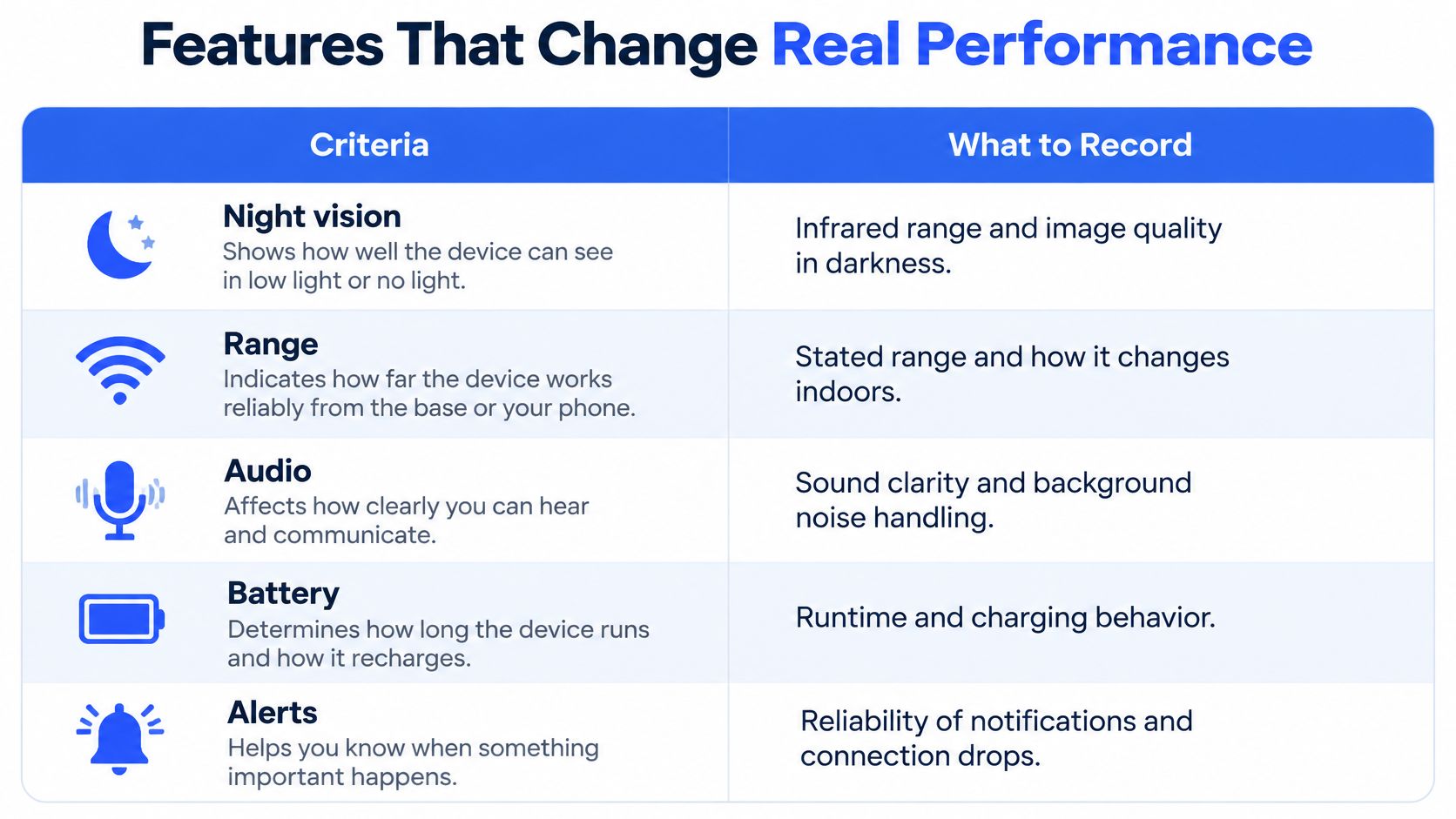
Performance criteria to record for each monitor
| Criterion | What to record | Why it changes results |
|---|---|---|
| Night vision | Infrared range and image quality in darkness | A dark nursery requires usable detail, not just an illuminated image |
| Range | Stated open-air distance and wall count | Walls can reduce usable indoor range |
| Alert delay | Seconds from sound or movement to phone alert | Delay affects how quickly a caregiver receives notice |
| Signal-loss behavior | Whether local viewing continues during an internet drop | Determines usability when broadband fails |
| Battery backup | Hours of operation without mains power | Determines which functions survive a power cut |
| Valid-measurement coverage | Percentage of time a breathing or heart-rate reading is available | Unavailable readings leave gaps in monitoring |
Check the conditions behind each claim
Night vision should be assessed against the planned mounting position. A documented infrared distance doesn't establish that a caregiver can distinguish the detail needed at that distance. Seller images should also be checked for whether they show darkness or a lit room.
Range needs its measurement conditions attached. An open-air specification isn't an indoor guarantee through floors and walls. A household comparison should record the route between the nursery and the intended receiver location, without inventing an indoor distance from the advertised figure.
For alert delay, the useful measure runs from the triggering sound or movement to notification delivery. A listing that says instant alerts but gives no timing leaves that criterion unconfirmed. Audio documentation should also explain sound activation, background-noise handling and whether listening continues when the screen sleeps.
Signal-loss behavior requires separate answers for broadband failure, router failure and cloud-service interruption. A camera that retains local viewing may still lose app alerts. Similarly, a rechargeable parent screen doesn't establish battery backup for the nursery camera.
Breathing estimates need coverage as well as accuracy
A clinical study published in npj Digital Medicine recorded approximately 426.6 hours from 30 preterm infants and reported accurate camera-derived heart-rate and respiratory-rate estimates for at least 90% of the time when gaps of up to 30 seconds were accepted; respiratory-rate mean absolute error was 3.5 breaths per minute for more than 82% of monitored time.
These are study-specific results, not specifications for retail cameras. Their value for buyers is the distinction between agreement with a reference monitor and the share of time a usable estimate exists. A continuous-tracking claim without coverage information is incomplete.
Camera framing, movement, blankets and occlusion belong in the documentation check. A reassuring number isn't enough if the product doesn't explain what appears when measurement stops.
The video offers supplementary category context, not evidence of Comredix hands-on testing.
For each shortlisted model, the comparison notes should include:
- Evidence location: The maker's specification page or manual supporting the claim.
- Operating conditions: Lighting, distance, power state and required connection.
- Failure display: How the caregiver learns that video, alerts or measurements have stopped.
- Unconfirmed fields: Missing timing, runtime or coverage information, kept distinct from documented results.
Health Tracking Claims and What They Cannot Prove
More sensors don't prove more safety. The NIH Safe to Sleep program says home heart, breathing, motion and similar monitors aren't recommended as the primary way to detect sudden infant death syndrome, or SIDS. It distinguishes these products from ordinary audio and video monitors, which let caregivers hear or see an infant from another room.
That distinction changes how a product should be assessed. A camera provides a view. A physiological sensor produces a measurement or estimate. Neither function, by itself, demonstrates that a product prevents sleep-related death.
The American Academy of Pediatrics' evidence review doesn't recommend video monitors or direct-to-consumer pulse-oximetry monitors as a strategy for reducing sleep-related death. It also advises caution with commercial SIDS-reduction claims and says monitoring mustn't substitute for recommended safe-sleep practices.
Accuracy needs a defined event and reference
In a study of smartphone-integrated consumer monitors, JAMA reported 88.8% sensitivity and 85.7% specificity for hypoxemia against an FDA-cleared reference oximeter, while noting that the evaluated consumer monitors weren't FDA-regulated as medical devices at the time. Those findings concern the evaluated devices and conditions, not every current sleep sensor.
Sensitivity describes how often a device identifies the target condition when it's present. Specificity describes how often it correctly identifies its absence. Neither is interchangeable with a broad accuracy label.
A missed event and a false alarm have different consequences. The former limits what a reassuring display can exclude. The latter can prompt unnecessary checks or wakings, especially when a caregiver interprets a wellness alert as a clinical warning.
A physiological reading is information to interpret, not permission to disregard a baby's condition.
A published analysis of real-world product reviews describes parental reports of false alarms, unnecessary wakings, stress and disrupted infant sleep, alongside reports of reassurance. Review reports don't establish a device's clinical failure rate, but they identify consequences that a feature checklist can miss.
Check the claim before valuing the sensor
A sleep-tracking product deserves a separate evidence check:
- Claim: Does it describe wellness information, an alert function or a medical purpose?
- Sensor type: Does it measure movement, estimate breathing from video or use pulse oximetry?
- Validation source: Was the exact device and intended use independently evaluated?
- Alert settings: Can caregivers understand thresholds, lost-signal warnings and notification controls?
Medical concerns belong with the child's clinician. A retail feature comparison can clarify claims, but it can't determine which monitoring a particular infant medically needs.
Privacy and Security for Connected Cameras
Consider a nursery feed viewed from a parent's phone away from home. That convenience requires more than a working camera: the account, network connection and remote service also become part of the monitoring system.
A peer-reviewed study of baby-monitor applications assessed network protections, privacy policies and possible data leaks in apps that stream nursery video over the internet. It reported that man-in-the-middle attacks could become possible when the monitoring phone used Wi-Fi while the parent's device connected through cellular data or another Wi-Fi network.
This isn't evidence that every connected camera has that weakness. It is a reason to demand documented protections rather than equate password access with complete security.
Separate access, storage and service dependence
A product page should answer distinct questions about who can enter the account, where recordings go and what requires the manufacturer's servers. Comredix's smart home statistics provide wider connected-home context, but a baby-monitor purchase still requires model-specific answers.
- Remote access: Does viewing outside the home require internet access and an active cloud account?
- Encryption and authentication: Does the maker document protection for transmitted footage and account access?
- Sign-in safeguards: Is two-step sign-in supported, and how does account recovery work?
- Caregiver sharing: Can adults receive separate accounts with removable permissions?
- Cloud retention: What video, audio and derived data are stored, and for how long?
- Service interruption: Can the camera still provide local viewing if the cloud service stops?
A statement about encrypted video doesn't answer a question about storage retention. Separate caregiver accounts also matter operationally: access should be removable without changing the main caregiver's credentials.
Privacy trade-off: Remote access adds a service relationship, not just a viewing feature.
A closed local monitor avoids an internet viewing path, but that doesn't remove the need to follow pairing and access instructions. Local-only models give up remote access in exchange for more control over the monitoring path and data handling. That trade-off should be deliberate.
Matching a Monitor to Your Household
The best-fit type follows the household's constraints, not the longest feature list. A nearby caregiver, a travelling parent and a caregiver who needs tactile alerts have different requirements. Extra analytics won't repair a missing alert pathway.
The household guide helps connect the monitoring task to the home setup.
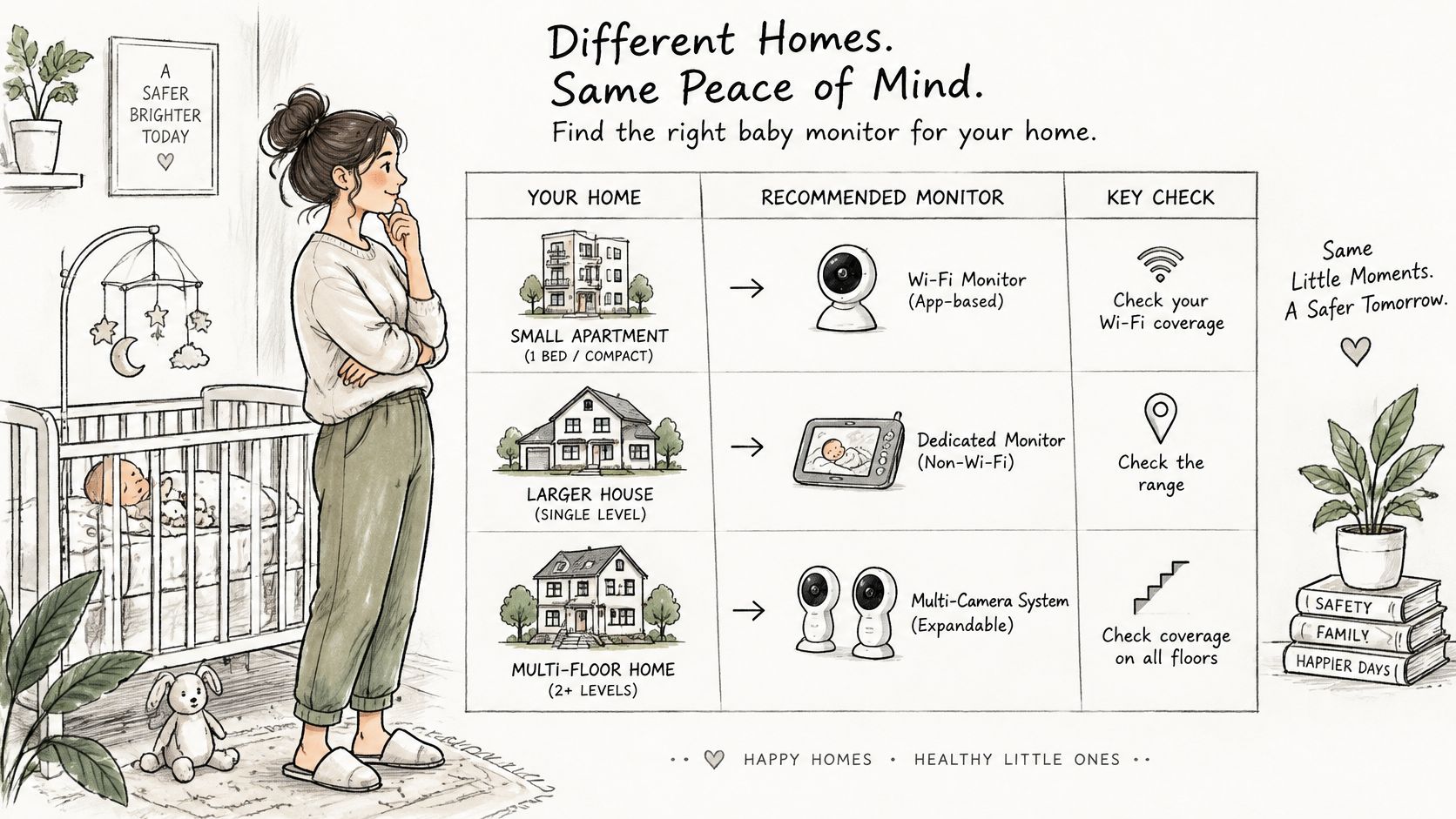
Best-fit monitor type for each household case
| Household case | Best-fit monitor type | The one check that matters |
|---|---|---|
| Single nearby room, light sleeper | Audio only or video with audio | Range and battery backup |
| Parents who travel or work away | Wi-Fi camera with app | Account security and outage behavior |
| Deaf or hard-of-hearing caregiver | Video with visual or vibration alerts | Alert options such as light, vibration or smartwatch |
| Home with unstable broadband | Local-only video or audio | Offline alerts and local storage |
| Shared caregiving | Wi-Fi camera with separate accounts | Individual logins and sharing controls |
| Breathing or oxygen readings wanted | Sleep sensor, used as supplementary | Validation data and alert settings |
Match the receiver to the caregiver
For a nearby room, audio may satisfy the task if the caregiver only needs to hear activity. Video adds a visible check, but a remote account isn't necessary merely because the device has a camera. The receiving unit must remain usable where the caregiver rests.
Parents away from home need a documented remote-viewing path. That access supplements the adult physically caring for the baby; it doesn't transfer the ability to respond through the screen.
For Deaf or hard-of-hearing caregivers, sound quality alone is the wrong priority. Documentation should identify light, vibration, smartwatch or phone-accessibility alerts, including whether they work with the screen locked. A PubMed-indexed publication on technology and disability identifies Deaf-led alarm design as an area of development, reinforcing the need to assess accessibility separately from camera quality.
Match the connection to the home
A household with unreliable broadband should prioritize documented local operation. Local storage and offline alerts need separate confirmation because retaining footage doesn't necessarily mean the caregiver receives a warning.
Shared caregiving requires an account arrangement that reflects changing responsibilities. Each adult should have appropriate access without borrowing the main account, and departing caregivers should be removable.
Families seeking breathing or oxygen information should choose based on the specific validated purpose, not the presence of a graph. Professional advice matters when the reason for buying is a health concern rather than general room monitoring.
Comredix's baby and parenting statistics offer broader family context. The final household decision remains practical: will the necessary function still work when the internet, the phone or the sensor fails?
Model Comparison Sheet
A shortlist should contain documented entries, not inferred specifications. Three monitor types dominate the category, and each fails in a different way when household conditions change. A dedicated-unit video monitor depends on its stated range. A Wi-Fi camera depends on broadband and app permissions. An audio monitor depends on alert delivery reaching a caregiver who may not hear it.
Model comparison by documented features and price
| Monitor type | Entries to complete for each candidate model |
|---|---|
| Video with audio, dedicated parent unit | Stated open-air range, night-vision range, alert delay, offline alert behavior, battery backup, seller price with date checked |
| Wi-Fi camera with app | Offline viewing and alert behavior, subscription fee, functions remaining after trial expiry, caregiver access controls, seller price with date checked |
| Audio only | Stated range, battery backup, alert type covering sound, light or vibration, seller price with date checked |
A completed sheet compares rows of evidence. An empty sheet compares marketing.
Complete the evidence fields before ranking
Each candidate model needs an expanded record covering stated open-air range, night-vision range, alert delay, offline alerts, battery backup, subscription fee and purchase price. The maker's specification page or manual should support technical entries. The seller's own page should support the purchase quotation.
Unconfirmed entries should read Not confirmed, rather than receive an estimate. A missing alert specification mustn't become an assumption that alerts work offline. A missing subscription statement mustn't become an assumption that the service is free. These two errors carry real costs: the first surfaces during a broadband outage, the second after a trial period ends.
- Exact model: Record the full model identifier and included camera or receiver bundle, since manufacturers sell the same camera name in different configurations.
- Specification evidence: Keep the supporting page beside the claimed capability.
- Seller quotation: Link every price entry to the seller and record the date checked.
- Plan requirements: Distinguish included functions, trial access and paid features.
The Comredix product comparison chart provides a side-by-side format for arranging these rows once the evidence is gathered. For baby monitors, the record should also preserve the conditions attached to each claim, because a range figure measured in open air says little about a house with brick walls.
Treat missing information consistently
A row with unconfirmed alerts or subscription requirements is incomplete. It shouldn't compete against fully documented alternatives as though the omissions were advantages.
Read across each completed row for the household's required task. A documented local connection can outweigh optional analytics in an unreliable-broadband home. A confirmed tactile alert pathway can matter more than additional image detail for a caregiver who can't rely on sound.
Documentation completeness is a condition for ranking, not a substitute for performance. It establishes what can responsibly be compared.
Choose a Monitor and Verify Its Specs First
The purchase decision should follow a completed evidence record. A feature matters only if it serves the household's task under the conditions in which it will be used.
Choose the monitoring task. Select a type for hearing, viewing or supplementary tracking. Avoid paying for analytics just because they appear beside a camera's core functions.
Confirm the performance specifications. Record the maker's stated range, night vision and alert timing, together with their conditions. Keep unsupported marketing language out of the scored comparison.
Verify offline behavior. Establish which viewing and alert functions remain available without internet access. Treat an undocumented fallback as unconfirmed, not automatic.
Read the account and payment terms. Identify storage rules, caregiver access controls and required subscriptions, including any monthly fee. Check which functions remain after a trial expires.
Inspect the health claim. Establish whether the feature is intended for wellness information or a specifically authorized medical use. Don't accept a SIDS-prevention implication as evidence of benefit.
Check the seller's current price. Record the linked quotation and checking date beside the exact bundle. Rank the completed shortlist using the same criteria and the household's actual requirements.
Decision standard: An attractive specification isn't a verified match until its operating conditions fit the home.
Comredix's Kids & family category covers baby gear, toys, apps and services for parents and children, with 4 rankings. Its comparison approach keeps documented capabilities separate from assumptions about daily use.
The final choice should make the caregiving task clearer, not turn missing documentation into reassurance. No consumer monitor replaces safe-sleep practices or medical advice.
Comredix offers independent reviews and rankings based on documented features and published prices. Visit Comredix to compare baby-monitor options, then verify the shortlisted model's manual, seller price and required subscription before buying.
Comredix. (2026, November 26). Compare Baby Monitors: Types, Features and Safety Claims. https://comredix.com/compare-baby-monitors
Spotted an error in this guide? Email editorial@comredix.com